A sleep card that draws your night as a hypnogram

The Life Dashboard Sleep Card is an open-source Home Assistant dashboard card, installed from the Marketplace (HACS before Home Assistant 2026.11). It draws one night with each stage in its own lane along the night's clock, with time asleep and each stage's duration and share. It reads the Life Dashboard integration, for Android and iPhone, or on Android the official Companion app.

Get it on HACS

Sleep stages guide · Source on GitHub

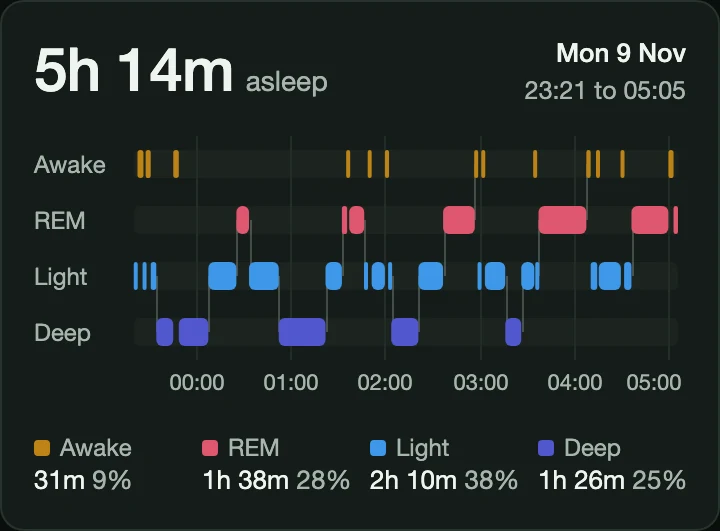
The Life Dashboard Sleep Card on a dark theme with sample data: 5h 14m asleep, Mon 9 Nov, 23:21 to 05:05, four lanes for awake, REM, light and deep with the stages as blocks along an hour axis, and each stage's duration and share

What it does

The shape of the night

One lane per stage, with connectors between them, so the cycles show at a glance. A short blip stays visible, also on a night with 60 stages at phone width.

  • The numbers beside it

    Time asleep, the night's start and end, and each stage's duration and share of the night.

  • Every segment on demand

    Hover or tap a block for its stage, start, end and duration.

  • Keyboard and screen reader

    Focus the plot and step through the stages with the arrow keys, Home and End. Screen readers get a text table of the whole night.

  • Your locale and theme

    Hour ticks in your language and time format, and the stage colors as CSS variables a theme can set.

  • Honest about what's missing

    A night that only reports sleep draws an asleep lane and says so, and a sensor without stages shows an empty state instead of a broken chart.

  • Nothing leaves your browser

    The card reads the sensor state Home Assistant already gives your browser. No requests of its own, no telemetry and no analytics.

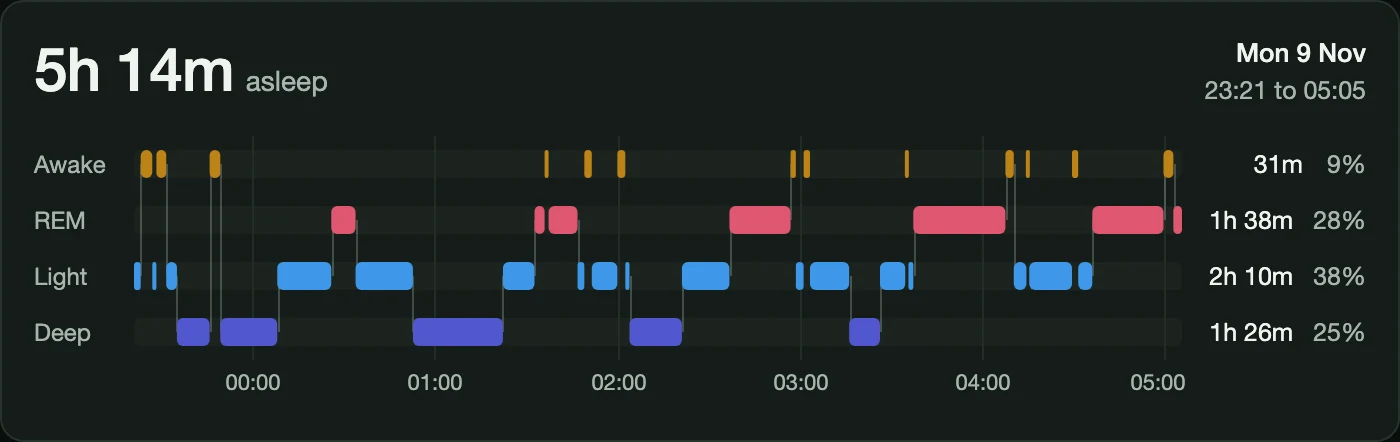
The Life Dashboard Sleep Card at phone width with sample data: 5h 14m asleep, the four lanes along the hours, and each stage's duration and share below them

Sample data

One night, stage by stage

The card draws the newest night your sensor holds: awake, REM, light and deep as four lanes along an hour axis, and under them how long each stage lasted and its share of the night. On a phone it fits the sections view.

  • Time asleep on top With the night's date and when it started and ended.
  • The stages it knows Awake, light, deep, REM, asleep, out of bed and unknown. Out of bed counts as awake, and other names are drawn as neutral.
  • The nights before it The card draws one night. With Life Dashboard, the hours per stage of every night are long-term statistics, for a Statistics graph card.
The stages attribute
stages:
  - stage: light
    start: "2026-11-08T23:21:00+01:00"
    end: "2026-11-08T23:52:00+01:00"
  - stage: deep
    start: "2026-11-08T23:52:00+01:00"
    end: "2026-11-09T00:40:00+01:00"
  - stage: rem
    start: "2026-11-09T00:40:00+01:00"
    end: "2026-11-09T01:04:00+01:00"
  # ... until the night ends

From Life Dashboard, or from the Companion app on Android

The card runs in your browser and reads two shapes of sensor, with nothing to configure.

  • Life Dashboard, Android and iPhone sensor.your_phone_last_sleep_asleep from the integration, 1.1.0 or newer, with the night's timeline in its stages attribute.
  • The official Companion app, Android sensor.your_phone_health_connect_sleep_duration from Companion app 2026.11.1 or newer, with the Sleep duration sensor switched on.
  • Not the iOS Companion app It has no timeline of stages. On an iPhone, use the Life Dashboard app and the integration.
Sleep stages in Home Assistant
Dashboard YAML
type: custom:life-dashboard-sleep-card
entity: sensor.your_phone_last_sleep_asleep
title: Last night

The card picker, or three lines of YAML

Add the card from the card picker, which offers the sensors that carry a night, or write it in YAML. Language, time format and time zone follow your Home Assistant profile.

  • entity A sensor with sleep stages, in either of the two shapes.
  • title Optional: text above the time asleep.
  • Stage colors Five CSS variables, such as --life-dashboard-sleep-deep, so a theme can set them.
Every option and the stage colors

Install the Sleep Card

Life Dashboard Sleep Card

One night of sleep as a hypnogram

Get it on HACS

In Settings > Marketplace (HACS before Home Assistant 2026.11), search for Life Dashboard Sleep Card and download it. Then add it from the card picker.

  • Sleep stages guide AvailableThe sensors and statistics per night, and the card on a dashboard, step by step.
  • Source on GitHub AvailableRelease notes, every option and the install by hand.

What you need

Home Assistant 2026.3 or newer. From 2026.11 the Marketplace is built in; older versions need HACS, where the card is in the default list. And a sensor with sleep stages: the Life Dashboard integration 1.1.0 or newer with the app for Android or iPhone, or on Android the official Companion app 2026.11.1 or newer. Your watch or ring has to record the stages.

Reads the Life Dashboard integration with the app for Android or iPhone, or on Android the official Companion app.

Dashboards in YAML mode
lovelace:
  resources:
    - url: /hacsfiles/life-dashboard-sleep-card/life-dashboard-sleep-card.js
      type: module

Only for dashboards in YAML mode. On storage mode dashboards the resource is registered for you. Without the Marketplace, the README has the install by hand.

Questions about the Sleep Card

Do I need the Life Dashboard app for this card?

Not on Android. There the card also works on its own with the official Home Assistant Companion app, 2026.11.1 or newer, with its Sleep duration sensor switched on and Health Connect access for sleep. Life Dashboard adds the history around the night: every night in long-term statistics, and both phones. On an iPhone you need the Life Dashboard app and the integration.

Does it work with an Apple Watch?

Yes, through Life Dashboard for iPhone and the integration, 1.1.0 or newer. The app reads the night from Apple Health and sends its stages along. The iOS Companion app alone is not enough, since it has no timeline of stages.

Can it show earlier nights or a whole week?

No, the card draws one night, the newest. The integration keeps the hours of deep, light, REM, awake and asleep of every night as long-term statistics, and a Statistics graph card draws those per day, week or month. Sleep stages in Home Assistant shows how.

Why does my night show a single lane?

Because the app that recorded it wrote the night as sleep only, without stages. The card then draws an asleep lane and says so, since it cannot show what was not measured. A night with deep, light, REM and awake gets the four lanes.

Is there another hypnogram card for the same sensor?

Yes. Lavve's Hypnogram card, also in the Marketplace, reads the same stages list from its version 0.1.9. The sleep stages guide has the YAML for it.

Does the card send my data anywhere?

No. It only reads the sensor state Home Assistant already gives your browser, and makes no requests of its own. It has no telemetry or analytics.

Step by step: Sleep stages in Home Assistant