 Life Dashboard
How do I send Health Connect data to my own webhook as JSON?
Life Dashboard Companion, an open-source Android app, reads Health Connect on a schedule and sends every new record to the URLs you enter, as an HTTPS POST with a JSON body. Each payload holds the records of the types you switched on (33 in all, from steps and sleep stages to heart rate, weight and blood pressure), each with a stable uuid and the app that wrote it, plus daily totals that count a walk once.
With a secret set, every request is signed with HMAC-SHA256 in an X-Signature header, and payloads that can't be delivered wait in an outbox on the phone for the next sync. Any receiver that accepts JSON works, including n8n, Node-RED, a small script or the Life Dashboard stack with Postgres and Grafana.
Why it takes an app on the phone
Health Connect has no web API. It's a store on the phone that apps read through Android, so something on the phone has to read it and send it on. Life Dashboard Companion does that and posts straight to your URL, with no cloud service or Google account in the path. One payload holds every source: what Samsung Health, Google Health (Fitbit and Pixel Watch), Garmin Connect, Oura and Withings write to Health Connect, each record tagged with the app that wrote it. Google's cloud route, the Google Health API, needs a Google Cloud project and an OAuth client, and only sees what reaches your Google account.
What you need
- Android 9 or newer with Health Connect, and an app that writes to it, such as Samsung Health, Garmin Connect or Google Health.
- Life Dashboard Companion for Android, from GitHub Releases or Obtainium. The install options list every source.
- A server that accepts a JSON POST over HTTPS, with a body limit of at least 10 MB. Plain HTTP on your own network needs Allow plain HTTP webhooks under Advanced.
Set it up
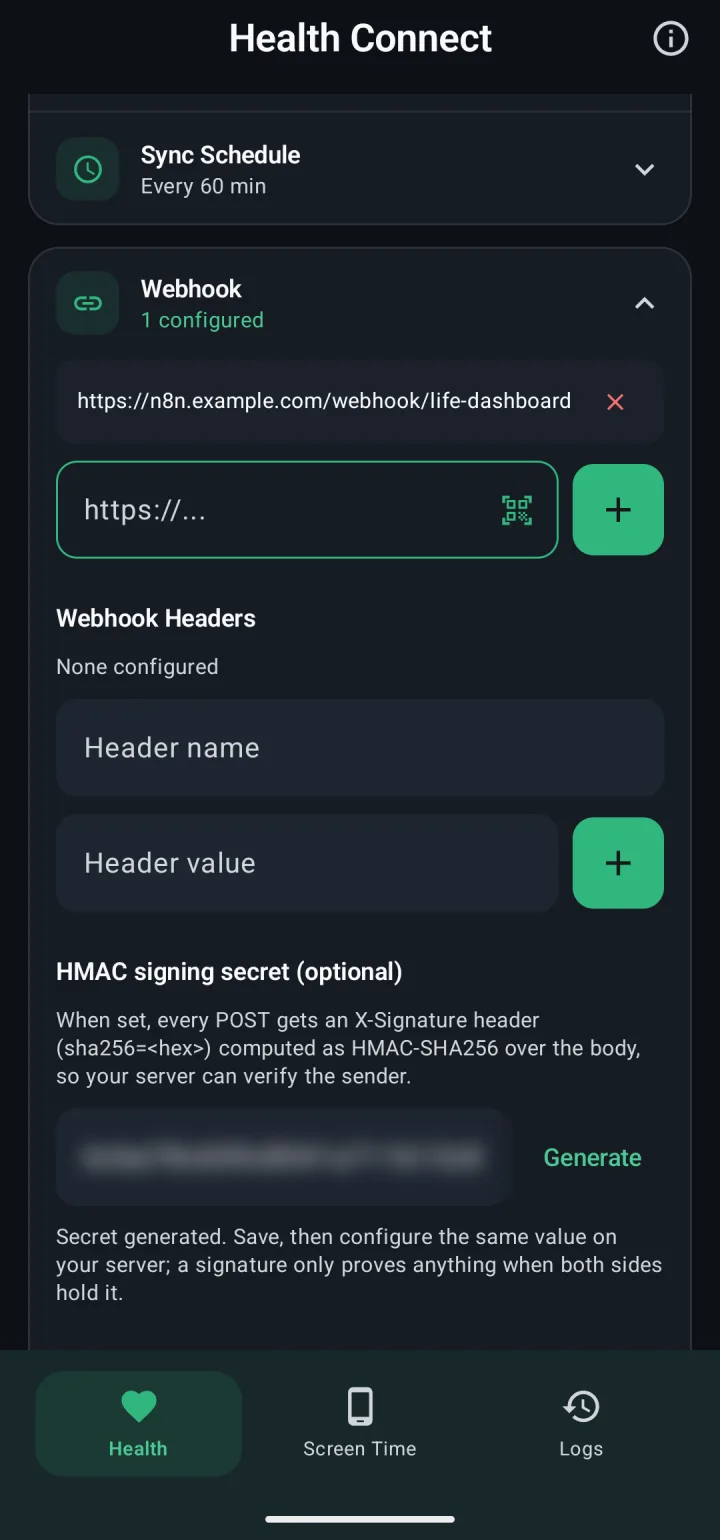
- On the Health tab, open Webhook, paste your URL in the address field and tap the add button. The Screen Time tab has its own list.
- Optional: add an
Authorizationheader or API key under Webhook Headers. - Under HMAC signing secret (optional), tap Generate and put the same value on your server.
- Tap Test ping to check that your server accepts the request, then Save Changes.
- Grant the Health Connect permissions and tap Sync Now. Backfill sends the last 30, 90 or 365 days.
What the POST looks like
Every request is a POST with Content-Type: application/json; charset=utf-8. A sync payload with steps and heart rate, shortened:
{
  "timestamp": "2026-10-04T07:15:02.481Z",
  "app_version": "1.23.0",
  "source": "health_connect",
  "sequence": 1842,
  "daily_totals": [
    {
      "date": "2026-10-04",
      "steps": 1204,
      "distance_meters": 911.6,
      "active_calories": 58.2,
      "total_calories": 702.9
    }
  ],
  "steps": [
    {
      "uuid": "eb52b2c4-e3f7-49f3-8f92-34ca86640305",
      "source": "com.fitbit.FitbitMobile",
      "count": 412,
      "start_time": "2026-10-04T06:00:00Z",
      "end_time": "2026-10-04T07:00:00Z"
    }
  ],
  "heart_rate": [
    {
      "uuid": "708a76cb-45d3-45ea-9f8b-26d6d55d2692#1791097080000",
      "source": "com.fitbit.FitbitMobile",
      "bpm": 61,
      "time": "2026-10-04T06:58:00Z"
    }
  ]
}
A record's source is the package name of the app that wrote it. The payload reference documents every type, and a JSON Schema lets you validate what arrives.
Check the signature
With a secret set, each request carries X-Signature: sha256=<hex>, the HMAC-SHA256 of the raw body. Use the secret as UTF-8 text, without decoding it, and compute the HMAC over the bytes as they arrived, before you parse them. Compare in constant time and respond 401 to a mismatch:
expected = "sha256=" + hmac.new(SECRET, body, hashlib.sha256).hexdigest()
valid = hmac.compare_digest(expected.encode(), presented.encode())
For a reverse proxy that requires a client certificate, install it in Android's settings and pick it under Advanced > Client certificate (mTLS).
Retries, outbox and deletions
- Retries. Any 2xx counts as delivered. A timeout, network error, 408, 429 or 5xx gets 3 attempts. A 400, 413 or 422 is not retried: the app offers that payload again on every sync for a week, then drops it, while later payloads go out as usual. The app waits at most 10 seconds, so respond first and store afterward.
- Outbox. A failed payload stays on the phone and goes out first on the next sync. The outbox holds up to 700 Health Connect payloads, a week of 15-minute syncs. After a 401 or 404, later payloads wait until you fix the setup, then arrive in order.
- Duplicates and late payloads. A record can arrive again after a retry or in a backfill, so store records keyed on
uuid. A payload that waited in the outbox, or one your receiver refused and gets again later, can arrive after a newer one and still holds records no later payload repeats: apply its records as well. Usesequence, which only goes up, only to settle conflicts: a record that a payload with a higher number named indeleted_recordsstays deleted, anddaily_totalsfor a date come from the payload with the highest number that carried that date. - Deletions. A record deleted in Health Connect is named in the next payload's
deleted_records, with itstypeanduuid. Tracking starts when the app first syncs a type, and a type the phone can't vouch for on a sync is listed indeletions_unavailable; reconcile those with a backfill.
Receivers that work
- The Life Dashboard stack. Published images for a receiver that checks
X-Signature, Postgres and Grafana with six dashboards, installed from one compose file or with a Helm chart. Scan its pairing QR code in the app, or point the app athttp://<host>:8080/webhook/<label>. See the Life Dashboard stack. - n8n. A Webhook node with Raw Body on, a signature check, and a Respond to Webhook node that answers 204 or 401. Health Connect to n8n has the whole workflow, and the payload reference has the steps with a Crypto node.
- Node-RED. An http in node with Do not parse request body on (Node-RED 4.1 or later) gives the raw bytes for the HMAC.
- Home Assistant. The Life Dashboard integration turns the payload into sensors and long-term statistics.
- InfluxDB or anything else. There's no ready-made InfluxDB receiver, so write a small script. The payload reference has a Python and a Node.js receiver to start from.
Store it in Postgres
Whatever receives the POST, n8n or a script, the storage pattern is the same:
- Upsert each record on its payload key and
uuid, in atextcolumn. Heart rate and skin temperature samples carry a#and a time after the record's ID, so it isn't a Postgresuuid. - Keep
daily_totalsas one row per date, replaced only by a payload with a highersequence: today's is a running total. - Delete what
deleted_recordsnames, bytypeanduuid. For a heart rate or skin temperature record, delete every sample whoseuuidstarts with thatuuidand a#.
The receiver of the Life Dashboard stack does all three, if you'd rather not build it yourself, and serves the result back through a read-only API. Once the data is in Postgres, a model you choose can read it through a read-only MCP server: Health Connect data over MCP covers the stack's own server and one for a Postgres of yours.
The iPhone app sends the same payload
Life Dashboard Companion for iPhone posts Apple Health data with the same keys, units and signature, and "source": "healthkit_ios", so one receiver takes both phones. It sends the same sequence counter, and its HRV is SDNN where Android sends RMSSD, so keep the two apart. Today you build it from source with Xcode on a Mac. A public TestFlight beta is next. See how to get it.
Limits
- With several URLs, a payload counts as delivered once one accepts it, and the others don't get it again. The Logs tab shows each result.
- Data from more than 30 days before you first gave the app access needs Health Connect's history permission, which the backfill dialog asks for.
Install the app, point it at your URL and tap Test ping. The payload reference has every field and a receiver in Python and Node.js.
Get the Android app Payload referenceCommon questions
Can I use the Google Health API instead?
For data in your Google account, such as Fitbit and Pixel Watch, Google offers the Google Health API in its cloud, which needs a Google Cloud project and an OAuth client. Health Connect itself has no web API. Life Dashboard Companion reads it on the phone, so Samsung Health, Garmin Connect, Oura and Withings data arrive in the same payload, and nothing passes through a Google account on the way.
Can I see a real payload before I write a receiver?
Yes. View on the Health tab shows what the next sync would send, and Export shares it as JSON.
Does it send screen time too?
Yes, as a separate payload with "source": "screen_time", minutes per app per day for the last 7 days. See screen time per app.
How do I avoid counting steps twice?
Use daily_totals for steps, distance and calories. Adding up raw records counts a walk once per device that recorded it.
Is there a CSV export?
No. Health data leaves the app as JSON, and your receiver stores it in any format it likes.