 Life Dashboard
How do I see sleep stages in Home Assistant?
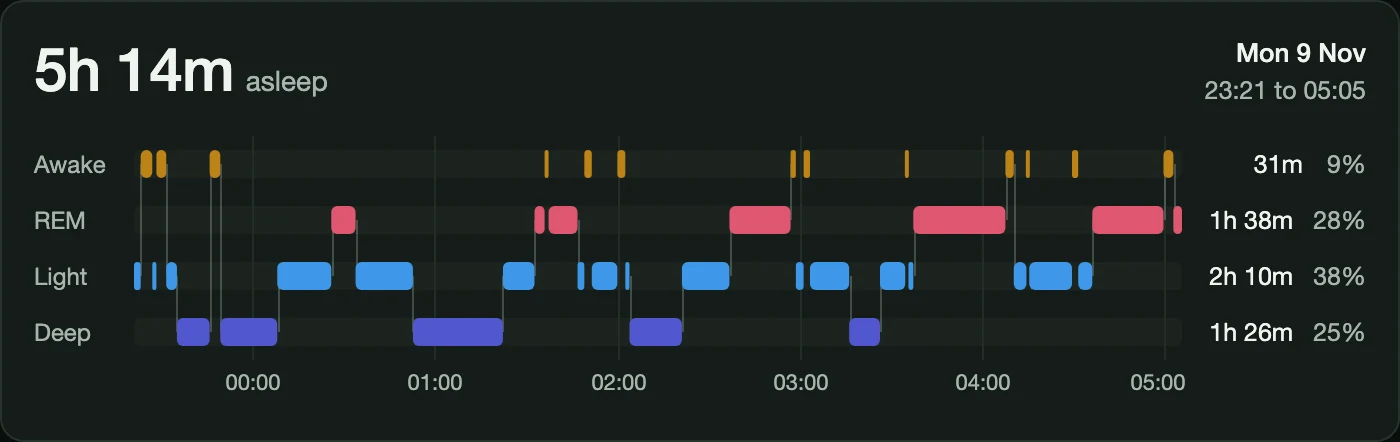
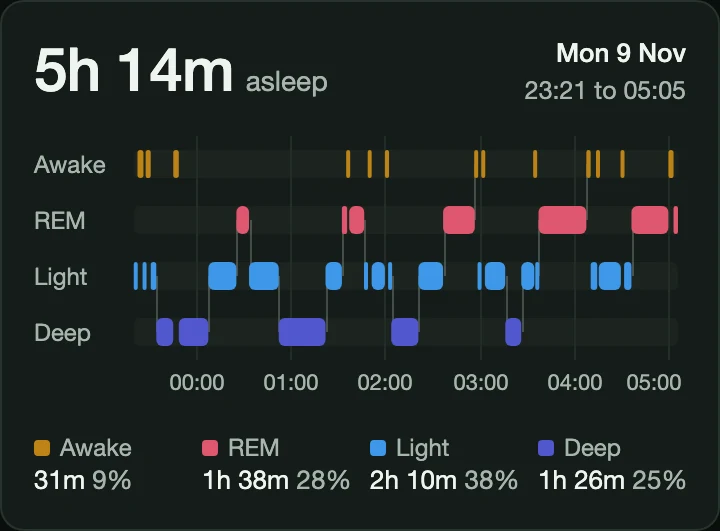
With the Life Dashboard integration 1.1.0 or newer, the sleep stages your phone sends become sensors and long-term statistics: deep, light, REM, awake and time asleep for each night, with one main night per wake date. The Life Dashboard Sleep Card draws the newest night on your dashboard as a hypnogram, with each stage in its own lane along the night's clock.
Open the card in the Marketplace
The card is a separate install from the Marketplace. On Android it also works on its own with the official Home Assistant Companion app, without Life Dashboard. The sensors and statistics below come from the integration.
What you need
- Home Assistant 2026.3 or newer.
- For the sensors and statistics: the Life Dashboard integration 1.1.0 or newer, and Life Dashboard Companion for Android or for iPhone on the phone.
- For the card: that integration and app, or on Android the official Companion app, as described further down.
- A night with stages to send. Samsung Health, Garmin Connect and Fitbit or Pixel Watch write them to Health Connect, and an Apple Watch writes them to Apple Health.
Sensors and statistics for every night
Each phone is one device, and the sensors start with its name. With a phone named Pixel 8 the first one below is sensor.pixel_8_last_sleep_asleep.
| Sensor | State | Attributes |
|---|---|---|
last_sleep_asleep | Hours actually asleep in the newest main night | night (wake date), start, end, source, the minutes of each stage, stages and measured_at |
last_sleep_deep, last_sleep_light, last_sleep_rem, last_sleep_awake | Hours of that stage, unknown when the night has none to report | night, measured_at |
The four stage sensors start disabled: enable the ones you want on the device page. A sensor in this table appears with the first night that has stages. last_sleep_duration stays what it was, the latest session of any kind, naps included.
The statistics sleep_deep, sleep_light, sleep_rem, sleep_awake and sleep_asleep hold the hours of the main night of each wake date, one row per date, stored as a mean. Chart them with stat_types: mean, per day, week or month. This is the graph in the integration's example dashboard:
type: statistics-graph
title: Sleep stages per night
chart_type: bar-stack
period: day
days_to_show: 30
stat_types:
  - mean
entities:
  - life_dashboard:<entry>_sleep_deep
  - life_dashboard:<entry>_sleep_light
  - life_dashboard:<entry>_sleep_rem
  - life_dashboard:<entry>_sleep_awake
Replace <entry> with your phone's ID: Developer tools > Statistics shows it after life_dashboard:. Nights from before the update don't have their stages stored. Send history in the app, under What to send on the Health tab, fills them in, each on its own date, and sending the same window again changes nothing.
What counts as the main night
A night belongs to its wake date, the date the session ended on in Home Assistant's time zone. A date gets one main night: the session with the most time asleep, then the longest. A nap or a second app that wrote the same night doesn't add up with it.
That is why these numbers differ from the statistic sleep_minutes, which counts every session whole on the day it ended, time in bed and awake included. Time in bed never counts as a stage, and where stages overlap, each moment goes to the most specific one, so nothing counts twice. Sleep stages in the integration's docs gives every rule.
Install the card
The card is in the Marketplace. In Settings > Marketplace (HACS before Home Assistant 2026.11), search for Life Dashboard Sleep Card and download it, or use this link, which opens it in your Home Assistant.
On storage mode dashboards the resource is registered for you. If your dashboards are in YAML mode, add it yourself:
lovelace:
  resources:
    - url: /hacsfiles/life-dashboard-sleep-card/life-dashboard-sleep-card.js
      type: module
The card's README also has the install without the Marketplace, from a file in your www folder.
Add it to a dashboard
Add the card from the card picker, which offers the sensors that carry a night, or in YAML:
type: custom:life-dashboard-sleep-card
entity: sensor.your_phone_last_sleep_asleep
title: Last night
entity is required and title, the text above the time asleep, is optional. Language, time format and time zone follow your Home Assistant profile. The stage colors are CSS variables, such as --life-dashboard-sleep-deep, so a theme can set them.
Prefer another look? Lavve's Hypnogram card, also in the Marketplace, reads the same list from version 0.1.9:
type: custom:hypnogram-card
entity: sensor.your_phone_last_sleep_asleep
stages_attribute: stages
state_mapping:
  deep_sleep: deep
  light_sleep: light
  rem: rem
  awake: awake
What the card shows
- The shape of the night. One lane per stage with connectors between them, awake at the top and deep at the bottom, so the cycles show at a glance. A short blip stays visible, also on a night with 60 stages at phone width.
- The numbers beside it. Time asleep, the night's start and end, and each stage's duration and share of the night.
- Every segment on demand. Hover or tap a block for its stage, start, end and duration. On a keyboard, focus the plot and use the arrow keys, Home and End. Screen readers get a text table of the whole night.
- What's missing, said plainly. A night that only reports sleep draws an asleep lane and says so, and a sensor without stages shows an empty state instead of a broken chart.
With only the official Companion app on Android
On Android the card works on its own with the official Home Assistant Companion app. It reads sensor.your_phone_health_connect_sleep_duration, and needs:
- The Android Companion app 2026.11.1 or newer, the version that added the stages.
- The Sleep duration sensor switched on, under Settings, Companion app, Manage sensors, with Health Connect access for sleep. The stages only come with that sensor, not with the separate per-stage duration sensors.
The sensor's state is in minutes and the card doesn't use it: time asleep comes from the stages. The iOS Companion app has no timeline of stages, so the card cannot draw a night from it. On an iPhone, use the Life Dashboard app and integration. What Life Dashboard adds on Android is the history around the night, every day in long-term statistics, and both phones; The companion app and Health Connect goes through the rest.
Limits
- The card draws one night, the one in the sensor. The
stagesattribute can be long, so the recorder doesn't keep it. Earlier nights live on in the statistics as hours per stage, without their timeline. - Over MQTT the apps publish one sleep sensor, the session's duration. The stage sensors, the statistics and the
stagesattribute are the integration's. - A night reaches the phone when the watch's app writes it, often after you wake up, and Home Assistant gets it with the next sync.
The card is one install from the Marketplace. The night it draws comes from the integration and the app on your phone, or on Android from the Companion app's Sleep duration sensor.
Open the card in the Marketplace The card on GitHubCommon questions
Does the card need the Life Dashboard integration?
On Android, no: it also reads the official Companion app's Sleep duration sensor from version 2026.11.1. On an iPhone, yes, because the iOS Companion app has no timeline of stages.
Why don't the stages add up to my sleep statistic?
The stage statistics hold the main night of each wake date. sleep_minutes counts every session whole on the day it ended, naps, time in bed and awake included, so the two differ on purpose.
Why can't I find last_sleep_deep?
Those sensors start disabled, and a sensor appears with the first night that has stages. Open the phone's device page and show the disabled entities to enable them.
Can the card show an earlier night?
It draws the night in the sensor you point it at, which is the newest main night. For earlier nights, chart the statistics, which keep the hours per stage per night.
Does the card work with other sleep sensors?
It reads the two shapes on this page. A sensor with real state history, such as a sleep tracking app that reports live, is what Lavve's Hypnogram card is built for. This card is for nights that arrive after the fact, as a list of stages.
Does the card send my sleep data anywhere?
No. It only reads the sensor state Home Assistant already gives your browser and makes no requests of its own. It has no telemetry or analytics. The card is free and open source under the MIT license.