 Life Dashboard
How do I get Health Connect data into n8n?
Install Life Dashboard Companion, an open-source Android app, and enter the production URL of an n8n Webhook node as its webhook. In n8n, turn on the Webhook node's Raw Body option, check the X-Signature HMAC in a Code node, answer 204 with a Respond to Webhook node, and then store each record keyed on its type and uuid. Data from Samsung Health, Garmin Connect, Google Health, Oura and Withings reaches n8n this way, because those apps write it to Health Connect on the phone.
The iPhone app sends Apple Health data in the same format, so one workflow takes both phones. This page covers the n8n side. The payload itself, retries and the outbox are in Health Connect to a webhook.
Watch or ringIts appHealth ConnectLife Dashboard Companionn8n
What you need
- Life Dashboard Companion for Android on Android 9 or newer with Health Connect, or the iPhone app. Today you build it from source with Xcode on a Mac. A public TestFlight beta is next.
- n8n, on n8n Cloud or self-hosted, reachable from the phone. Use HTTPS. Plain HTTP on your own network needs Allow plain HTTP webhooks under Advanced in the Android app; the iPhone app allows plain HTTP only to an IP address, a
.localname or a name without a dot. - Room for large requests. Allow at least 10 MB per request. n8n takes up to 16 MB by default, but a reverse proxy in front of it must allow that too: nginx allows 1 MB by default.
- The
cryptomodule in the Code node. n8n Cloud provides it. On self-hosted n8n, setNODE_FUNCTION_ALLOW_BUILTIN=crypto, on the task runner if you run one.
The workflow at a glance
Webhook (POST, Raw Body)
  -> Code: check signature
  -> If: valid is true
       true  -> Respond to Webhook (204)
                  -> Code: records    -> Postgres: upsert
                  -> Code: deletions  -> Postgres: delete
       false -> Respond to Webhook (401)
The response goes out before the database work, because the app waits at most 10 seconds for an answer.
Set up the Webhook node
- Add a Webhook node. Set HTTP Method to
POSTand pick a Path, such aslife-dashboard. - Set Respond to Using 'Respond to Webhook' Node. With Immediately, n8n answers 200 before the signature check runs, so a payload with a bad signature still counts as delivered.
- Under Options, add Raw Body and switch it on. The node then outputs the bytes as they arrived in the binary property
data, next to the parsed JSON inbodyand the headers inheaders. - Publish the workflow and copy the production URL. The test URL only listens while the editor waits for a test event, and the production URL only works while the workflow is published. A sync sent at another time gets a 404, and the app keeps that payload and the ones after it until the URL answers again.
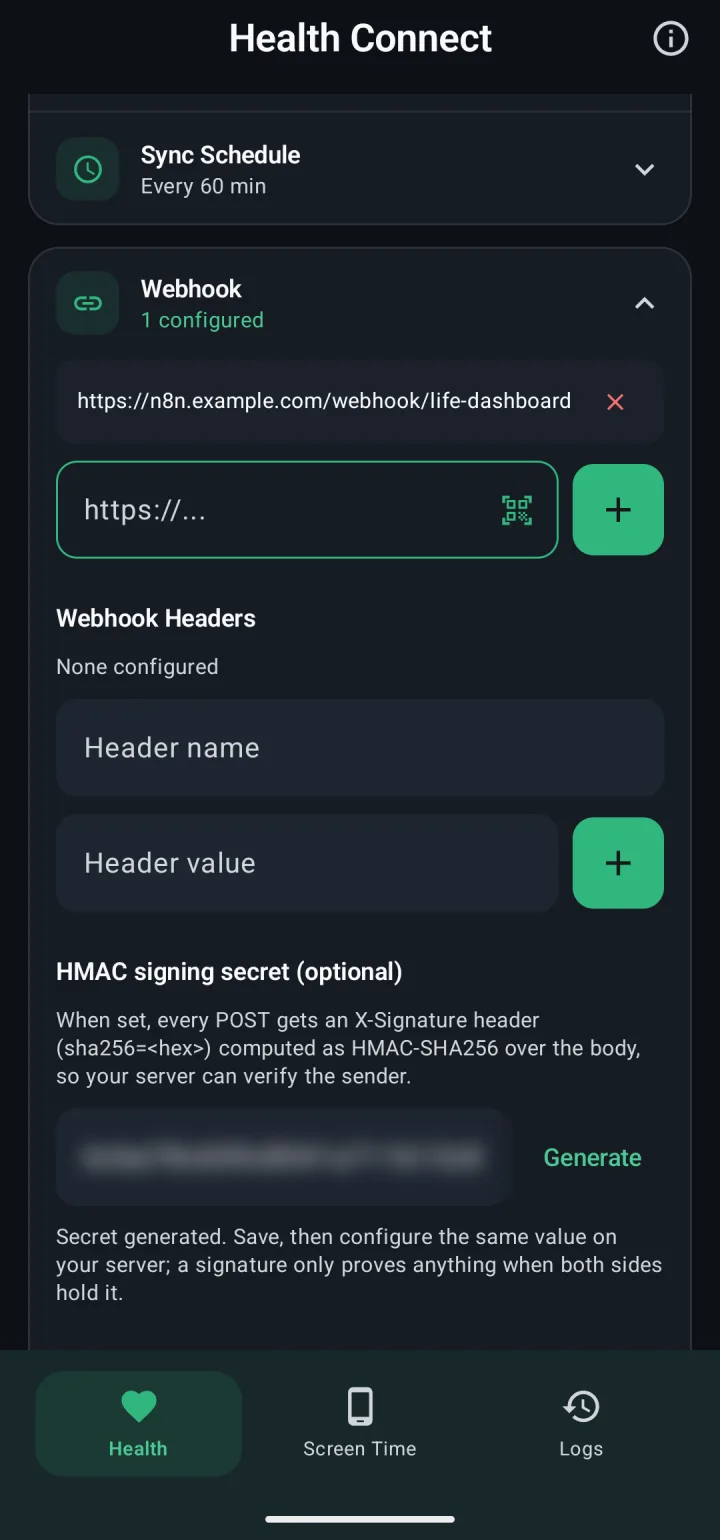
In the app, open Webhook on the Health tab, paste the production URL in the address field and tap the add button. Then tap Generate under HMAC signing secret (optional) and copy the secret for the next step.
Check the signature in a Code node
Every request carries X-Signature: sha256=<hex>, the HMAC-SHA256 of the raw body with your secret as the key. Add a Code node in JavaScript, mode Run Once for All Items:
const crypto = require('crypto');

// The secret as the app shows it. Use it as text: don't hex-decode it.
const SECRET = 'paste-the-secret-from-the-app';

const item = $input.first();
const raw = await this.helpers.getBinaryDataBuffer(0, 'data');
const expected = Buffer.from(
  'sha256=' + crypto.createHmac('sha256', SECRET).update(raw).digest('hex')
);
const presented = Buffer.from(item.json.headers['x-signature'] || '');
const valid = presented.length === expected.length &&
  crypto.timingSafeEqual(presented, expected);

return [{ json: { valid, payload: valid ? JSON.parse(raw.toString('utf8')) : null } }];- The HMAC runs over
raw, the bytes the app signed. Computing it overbodyserialized again gives a different string, and the check fails. - n8n gives header names in lowercase, so the header is
x-signature. timingSafeEqualcompares in constant time and throws on inputs of different lengths, so the length check comes first.- Anyone who can open the workflow can read the secret in the code. If that matters, the payload reference shows the same check with a Crypto node, which keeps the secret in an n8n credential.
Then add an If node with one condition: the boolean {{ $json.valid }} is true.
Respond before the slow part
End each branch of the If node in its own Respond to Webhook node with Respond With set to No Data. Under Options, set Response Code to 204 on the true branch and 401 on the false branch.
- 204. The app counts any 2xx as delivered. The nodes after the Respond to Webhook node still run, with the same item.
- 401. The app doesn't retry it. It keeps the payload, and the ones after it, in its outbox and delivers them once the secrets match.
- 500. If the workflow fails before a Respond to Webhook node runs, n8n answers 500. The app tries 3 times in all, then keeps the payload for the next sync.
Turn the payload into rows
After the 204, a second Code node turns the payload into one item per record:
const p = $input.first().json.payload;
if (!p || p.test) return [];

const rows = [];
for (const [type, value] of Object.entries(p)) {
  if (type === 'deleted_records' || !Array.isArray(value)) continue;
  for (const r of value) {
    if (!r || !r.uuid) continue; // daily totals and buckets carry no uuid
    rows.push({ json: {
      type,
      uuid: r.uuid,
      source: r.source ?? null,
      time: r.time ?? r.start_time ?? r.session_end_time ?? null,
      data: r,
    } });
  }
}
return rows;
A Test ping from the app gives no rows, so nothing after this node runs. Series you set to 1, 5 or 15 minutes or hourly under Data Resolution arrive as buckets without a uuid and are skipped here: leave Data Resolution on every record for this workflow, or store buckets in their own table keyed on the series and bucket_start.
Store it in Postgres, deduplicated on uuid
The same record can arrive more than once: after a retry, when its source edits it, and in every backfill. Key the table on type and uuid, both as text:
CREATE TABLE health_records (
  type   text NOT NULL,
  uuid   text NOT NULL,
  source text,
  time   timestamptz,
  data   jsonb NOT NULL,
  PRIMARY KEY (type, uuid)
);
Add a Postgres node with the operation Execute Query:
INSERT INTO health_records (type, uuid, source, time, data)
VALUES ($1, $2, $3, $4::timestamptz, $5::jsonb)
ON CONFLICT (type, uuid) DO UPDATE
SET source = EXCLUDED.source, time = EXCLUDED.time, data = EXCLUDED.data;
Under Options, add Query Parameters with this expression:
{{ [ $json.type, $json.uuid, $json.source, $json.time, JSON.stringify($json.data) ] }}- Pass values as Query Parameters, never as
{{ }}inside the SQL. n8n pastes an expression in the SQL as plain text, so a quote in a value breaks the query. - The key is
typeplusuuid, notuuidalone. Heart rate and skin temperature samples have auuidlike<record id>#<epoch ms>, and an iPhone sends one active energy sample under bothactive_caloriesandtotal_calories. - From Android, an edited record arrives with the same
uuidand new values, and the upsert replaces the old row. Apple Health doesn't edit in place: an edit arrives as a deletion and a new record.
Apply deleted_records
A record deleted in Health Connect or Apple Health is named in a later payload's deleted_records, with its type and uuid. A third Code node, also after the 204:
const p = $input.first().json.payload;
return (p?.deleted_records ?? []).map(d => ({ json: { type: d.type, uuid: d.uuid } }));
Then a Postgres node with Execute Query and the Query Parameters {{ [ $json.type, $json.uuid ] }}:
DELETE FROM health_records
WHERE type = $1 AND (uuid = $2 OR starts_with(uuid, $2 || '#'));
The second half deletes the samples of a heart rate or skin temperature record from Android. From an iPhone, a sleep deletion names one stage of the night, not the night, so this query leaves the night in place. A type listed in deletions_unavailable can't be vouched for on that sync: run a backfill from the app to reconcile it.
Once the records are in Postgres, a model can read them through a read-only role and an MCP server: Health Connect data over MCP has that route. If you'd rather not build the storage yourself, the receiver of the Life Dashboard stack deduplicates and deletes the same way, with dashboards, a read-only API and an MCP server on top.
Google Sheets or Telegram instead
One row per day in Google Sheets. A Code node after the 204 takes the daily totals, which count a walk once even when phone and watch both recorded it:
const p = $input.first().json.payload;
return (p?.daily_totals ?? []).map(d => ({ json: d }));
Then a Google Sheets node with Append or Update Row, a sheet with the columns date, steps, distance_meters, active_calories and total_calories, and date as the column to match on. Today's row is a running total and updates with every sync. A field is missing on a day without data for that type.
A Telegram message per new weight. After the records node, a Filter node keeps items where {{ $json.type }} is weight. A Remove Duplicates node with Remove Items Processed in Previous Executions, Keep Items Where set to Value Is New and {{ $json.uuid }} as the value to dedupe on stops a second message when the same weighing comes again in a backfill. Then a Telegram node with Send Message and the text Weight: {{ $json.data.kilograms }} kg.
Samsung Health, Garmin and Apple Health in one workflow
- Each record's
sourceis the package name of the app that wrote it, such ascom.sec.android.app.shealthfor Samsung Health,com.garmin.android.apps.connectmobilefor Garmin Connect orcom.fitbit.FitbitMobilefor Google Health. Filter on it to route one brand. - The top-level
sourceishealth_connectfrom Android andhealthkit_iosfrom an iPhone. On an iPhone, a record'ssourceis the name Apple Health gives the app or device. - Heart rate variability is RMSSD from Android and SDNN from an iPhone, under the same key. If both phones send to this workflow, store the top-level
sourcewith each record so the two stay apart. - Which types each app writes, and which it keeps to itself, is in Health Connect data types, app by app.
Limits
- n8n can't ask the phone for a date range. Start a backfill of 30, 90 or 365 days on the phone, under Backfill on the Health tab.
- Because the 204 goes out first, two payloads can be stored at the same time. Payloads also carry a
sequencethat only goes up: Health Connect to a webhook explains how to use it when order matters, such as fordaily_totals. - Screen time arrives as its own payload with
"source": "screen_time"from the URLs on the Screen Time tab. It has no recorduuids, so the records node above skips it.
Install the app, put the production URL of your published workflow in it and tap Test ping. The payload reference has the same check with a Crypto node.
Get the Android app n8n in the payload referenceCommon questions
Does this work on n8n Cloud?
Yes. The production URL of a published workflow is public HTTPS, and n8n Cloud provides the crypto module to the Code node. Self-hosted n8n needs NODE_FUNCTION_ALLOW_BUILTIN=crypto for the same code.
Why does the signature check fail on every request?
Usually one of three things: Raw Body is off, so there's no binary data to hash; the HMAC runs over the parsed body instead of the raw bytes; or the secret in n8n differs from the one in the app. Copy the secret again and use it as plain text.
Can I skip the signature?
Yes. Without a secret the app sends no X-Signature. Protect the URL another way, for example with Header Auth on the Webhook node and the same header under Webhook Headers in the app.
Does Samsung Health data reach n8n?
Yes, once Samsung Health shares it with Health Connect: steps, exercise, sleep with stages, heart rate, blood pressure, weight and more. Samsung Health doesn't share heart rate variability or resting heart rate with Health Connect, so those don't arrive.
Can I see a payload before I build the workflow?
Yes. View on the app's Health tab shows what the next sync would send. In n8n, the test URL with Listen for Test Event shows a real request in the editor.