 Life Dashboard
Is there a web API for Health Connect or Apple Health?
No. Health Connect and Apple Health are stores on the phone that apps read through Android or iOS, and neither offers an endpoint your server can call. To get the data onto a server, an app on the phone has to read it and send it on, which is what Life Dashboard Companion does on Android and on the iPhone.
Watch, ring or scaleIts appHealth Connect or Apple HealthLife Dashboard CompanionYour server
Health Connect is an Android API on the phone
Health Connect is Android's shared store for health data. Samsung Health, Garmin Connect, Google Health, Oura and Withings write into it, and other apps read from it with Health Connect's Android API, one permission per data type.
There's no server side. The records live on the phone, and only code running on that phone can read them. Health Connect also limits how far back an app can read: anything from more than 30 days before you first gave it access needs a separate history permission.
Apple Health is HealthKit on the iPhone
Apple Health works the same way. The data sits on the iPhone, apps read it through HealthKit after you allow each type, and Apple offers no web API for your Health data. iOS also encrypts Apple Health while the iPhone is locked, so even an app on the phone has to wait for you to unlock it.
The cloud routes that do exist
For data in a Google account, such as from a Fitbit or a Pixel Watch, Google offers the Google Health API in its cloud. It needs a Google Cloud project and an OAuth client, and it only sees what reaches your Google account. The older Fitbit Web API lost support on September 30, 2026 and turns off on October 30, 2026; tools built on it, such as Home Assistant's Fitbit integration, stop syncing then. Fitbit and Pixel Watch in Home Assistant covers the route through the phone.
Samsung Health has no cloud API you can connect to, and Samsung's own data SDK is open only to registered partners. Health Connect is the open route there too; see Samsung Health to your own server.
What you need
- An Android phone with Android 9 or newer and Health Connect, or an iPhone on iOS 17 or newer.
- Life Dashboard Companion for Android. Today you install the signed APK from GitHub, or through Obtainium, which keeps it up to date. Google Play is in closed testing, and F-Droid is reviewing the app.
- Or Life Dashboard Companion for iPhone. Today you build it from source with Xcode on a Mac. A public TestFlight beta is next.
- Somewhere to send the data: a server that accepts a JSON POST over HTTPS, Home Assistant, an MQTT broker, or the Life Dashboard stack.
Set it up
For your own server, on Android:
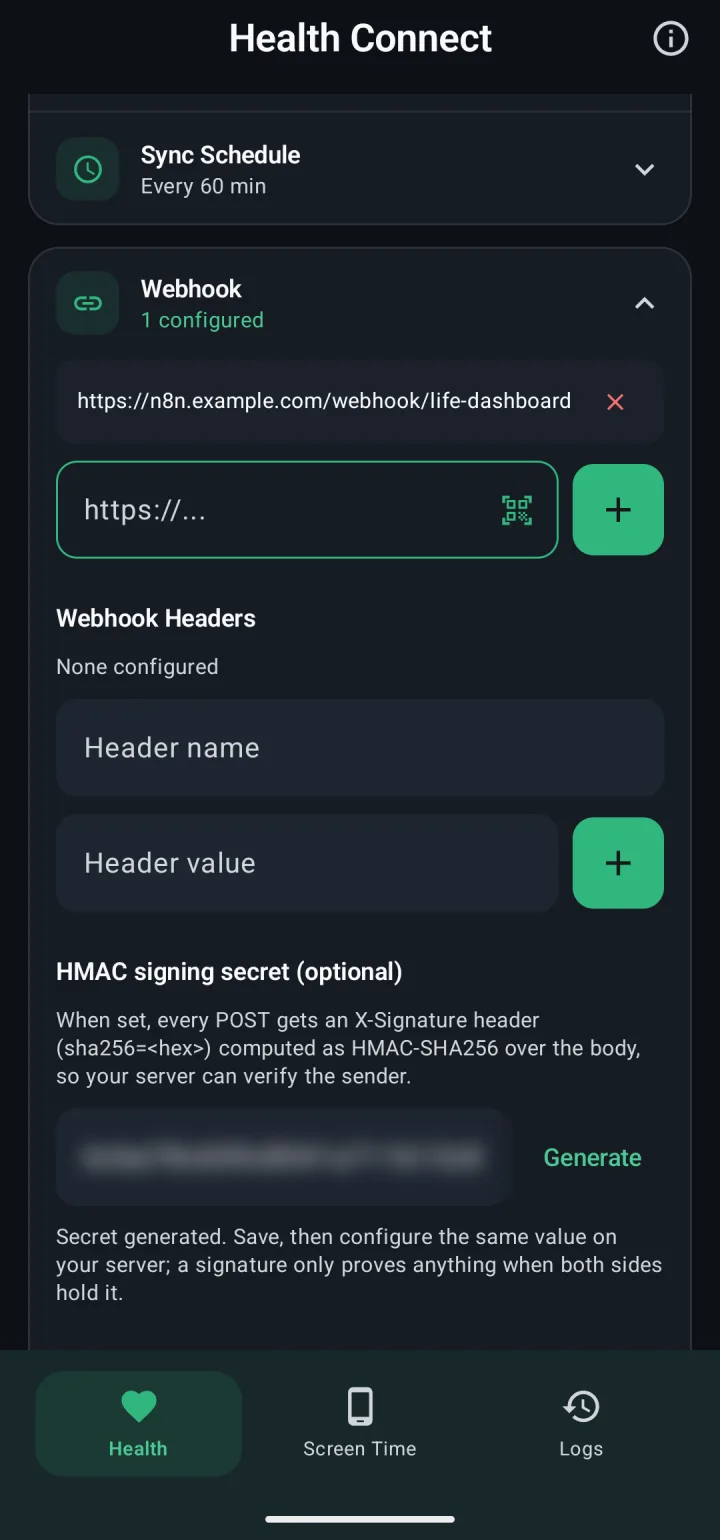
- Open the app. At Where should your data go?, pick Webhook and enter your URL.
- On the Health tab, open Webhook. Under HMAC signing secret (optional), tap Generate and put the same value on your server.
- Tap Test ping, then Save Changes.
- Tap Grant, allow your data types and reading in the background, then tap Sync Now.
- For older data, tap Backfill and pick 30d, 90d or 365d.
The iPhone app has the same settings on its own Health tab. Health Connect to a webhook has the full receiver guide.
What you get
- Every record as JSON. Up to 33 types from Health Connect, or 28 from Apple Health, each with a stable
uuidand the app that wrote it. - Daily totals that count a walk once. Steps, distance and calories come from the store's own deduplicated figures, so phone and watch don't add up to twice the number.
- One format for both phones. The iPhone app sends the same keys with
"source": "healthkit_ios", so one receiver takes both. - A signature. With a secret set, every request carries
X-Signature: sha256=<hex>, an HMAC-SHA256 of the body. - An API of your own, if you want one. The Life Dashboard stack stores the data in Postgres and serves it back as read-only JSON under
/api/, per day, night, workout or metric, behind a token. Its MCP server gives the same to a model you choose.
Limits
- Your server can't ask the phone for a date range. It receives what the phone sends, and you start a backfill on the phone.
- Data leaves the phone when the app syncs: every 60 minutes by default on Android, every 15 at the shortest. On the iPhone, iOS decides the exact moment.
- You only get what the vendor's app writes into the store.
Install the app on the phone and point it at your URL. The payload reference has every field and a receiver in Python and Node.js.
Get the Android app Get the iPhone appCommon questions
Can my server pull data from Health Connect?
No. Health Connect has no network interface. An app on the phone has to read it and push it out, as Life Dashboard Companion does.
Is there an Apple Health REST API?
No. Apps read Apple Health through HealthKit on the iPhone. Life Dashboard Companion for iPhone reads it there and posts the same JSON as the Android app.
Should I use the Google Health API instead?
It fits if all your data is in a Google account, from a Fitbit or a Pixel Watch, and you're fine with a Google Cloud project and an OAuth client. Health Connect on the phone also holds what Samsung Health, Garmin Connect, Oura and Withings write, and Life Dashboard Companion sends all of it in one payload.
Does my data pass through a cloud on the way?
No. There's no Life Dashboard server, and the app sends only to the destinations you enter. If you use Home Assistant Cloud to sync away from home, that's a path you chose.