 Life Dashboard
How do I get smart scale readings from Home Assistant into Samsung Health?
Want your watch's Samsung Health data in Home Assistant instead? See Samsung Health and Galaxy Watch in Home Assistant.
Map the scale's entities in the Life Dashboard integration and switch on Receive in Life Dashboard Companion, the open-source Android app that pairs with it. At the next sync, the integration hands each new reading to the app, and the app writes it into Health Connect with the time it was measured. Samsung Health and Google Health read weight and body fat from Health Connect, so the weight and body fat from a scale that only talks to Home Assistant end up in those apps. The same works for a blood pressure monitor, though whether an app shows that reading is up to the app.
What you need
- An Android phone with Health Connect and Life Dashboard Companion, paired with the Life Dashboard integration 0.7.0 or newer. The Health Connect guide covers the pairing. The iPhone app doesn't receive measurements, and MQTT can't carry them.
- The scale's readings as sensors in Home Assistant. A Bluetooth scale needs Bluetooth within a few meters: an adapter on the Home Assistant machine, or an ESPHome Bluetooth proxy near the bathroom.
Common routes into Home Assistant are Xiaomi BLE with bodymiscale for Xiaomi scales, ble-scale-sync for Renpho, Eufy, Yunmai and others, and the Withings integration. The scale recipe says which entity to map for each, and has the templates some routes need.
Set it up
- In Home Assistant, open Settings > Devices & services > Life Dashboard and choose Configure for the phone. Pick one entity per type. Each type has an optional Measured at slot for a timestamp sensor that holds when the weighing happened.
- In the app, on the Health tab, open Receive and switch on Receive measurements from Home Assistant.
- Switch on each type you mapped. Each one asks Health Connect for permission to write that type. If you refuse, the switch stays off.
- Step on the scale, then tap Sync Now or wait for the next sync. The Logs tab shows a row from Home Assistant with every reading and whether it was written.
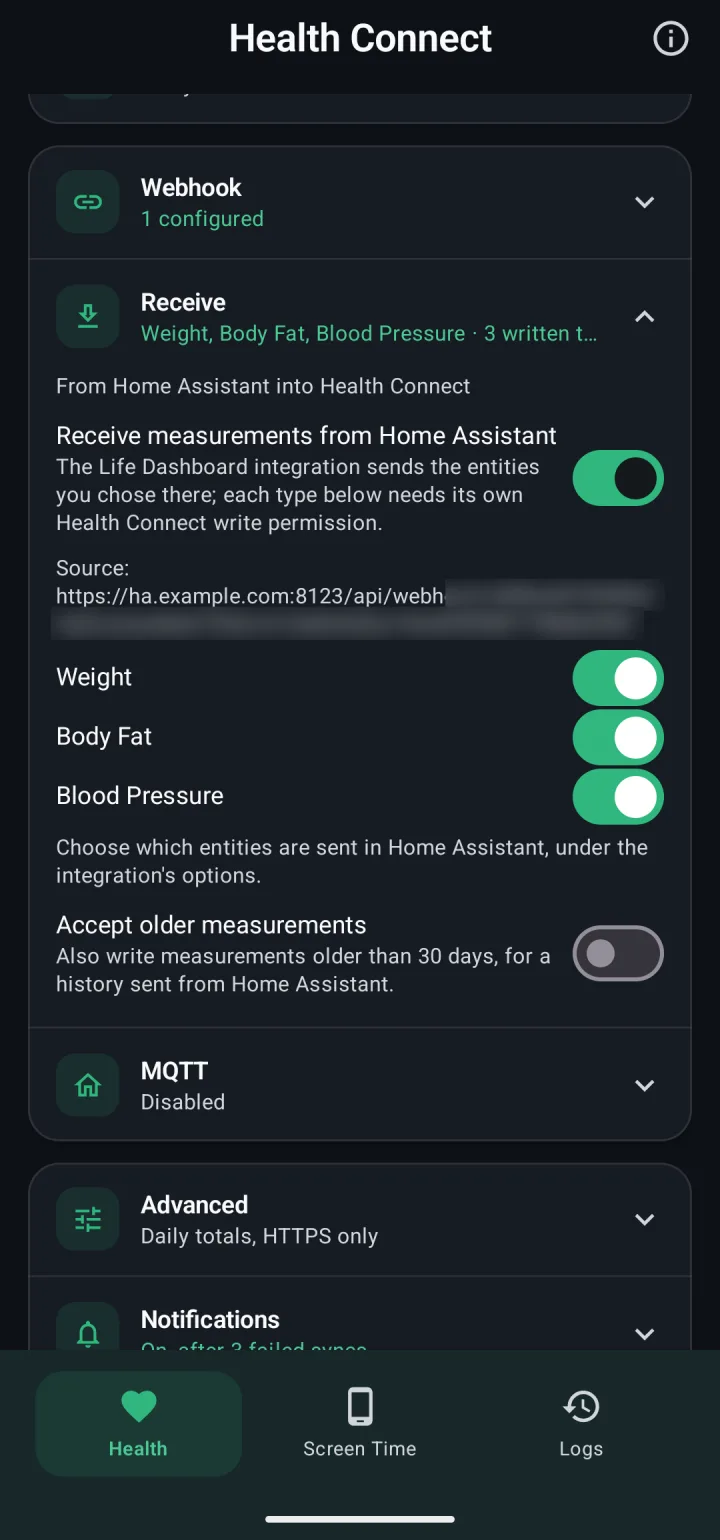
What it writes
| Type | Accepted range |
|---|---|
| Weight | 1 to 500 kg |
| Body fat | 1 to 80 % |
| Lean body mass | 1 to 300 kg |
| Bone mass | 0.1 to 30 kg |
| Body water mass | 1 to 300 kg |
| Height | 0.3 to 2.8 m |
| Blood pressure | Systolic 30 to 300, diastolic 10 to 250 mmHg |
Units are converted, so pounds and stones work. BMI, muscle mass, visceral fat and metabolic age have no Health Connect record, so they stay in Home Assistant. Most scales give body water as a percentage; the recipe has a template that turns it into kilograms.
How readings are handled
- The time is the weighing time. A weigh-in at 07:00 that syncs at 09:00 shows as 07:00 in Health Connect.
- One weighing is one reading. The same value within ten minutes counts as the same measurement, and a different value for the same moment replaces the earlier record.
- Signed both ways. The readings ride back in the integration's signed response to the request the app already makes. There's no second channel or second secret.
- Nothing echoes back. What the app writes is left out of what it sends, so your weight doesn't come back to Home Assistant as a second sensor.
- A warning about doubles. If the scale's own app already writes the same type to Health Connect, the app warns you as you switch it on. Keep one source, or every weighing lands twice.
What Samsung Health and Google Health show
The app can only promise that a reading reaches Health Connect. The rest is up to each app.
| App | What it picks up from Health Connect |
|---|---|
| Samsung Health | Weight and body fat. Lean body mass, bone mass and body water usually don't appear, and blood pressure from other apps is unverified. |
| Google Health | Weight and body fat. It doesn't read blood pressure. |
| Garmin Connect | No weight from Health Connect. |
A reading with Written in the Logs tab is in Health Connect, listed under its type with Life Dashboard as the source.
Older measurements
Readings older than 30 days are refused unless Accept older measurements is on in the app. The integration's Send history to phone button queues up to 30 days, as far back as Home Assistant's recorder keeps states (10 days by default). The life_dashboard.queue_history action reaches back up to 90 days. A reading the phone refused isn't offered again, so switch on Accept older measurements before you send history.
You need the Life Dashboard integration 0.7.0 or newer and the app on your phone, paired as in the Health Connect guide.
Open in HACS Get the Android appCommon questions
Why does my weight show up twice in Samsung Health?
The scale's own app, such as Zepp, Mi Fitness or Withings, also writes to Health Connect. Switch the type off under Receive, or stop the other app from writing weight in its own settings.
Does this work with an iPhone and Apple Health?
No. The iPhone app only reads Apple Health and doesn't write readings back.
How long until a weighing shows up?
Until the phone's next sync, every 60 minutes by default and 15 at the shortest. Sync Now fetches it right away.
Do the readings pass through a cloud service?
Not on the Life Dashboard side: they go from Home Assistant to the phone in the response to its own request. A cloud scale integration in Home Assistant still fetches from the vendor's cloud, and without a timestamp sensor its readings get the time Home Assistant fetched them.