 Life Dashboard
How do I send Apple Health data to a webhook automatically?
Install Life Dashboard Companion on your iPhone, add your URL under Webhook on the Health tab, and pick the Apple Health types to send. From then on the app reads Apple Health in the background on the schedule you set and posts every new record to your URL as JSON: steps, sleep with stages, heart rate, HRV, weight, blood pressure, workouts and more, 28 types in all, each record with a stable uuid and the app or device that wrote it.
With a secret set, every request is signed with HMAC-SHA256 in an X-Signature header. A payload that can't be delivered waits in a queue on the iPhone, and a record you delete in Apple Health is named in the next payload. The payload is the Android app's, so one receiver takes an iPhone and an Android phone alike.
iPhone or Apple WatchApple HealthLife Dashboard CompanionYour URL
Why it takes an app on the iPhone
Apple Health has no web API. It lives on the iPhone, and apps read it through Apple's HealthKit, so something on the iPhone has to read it and send it on. Life Dashboard Companion does that and posts straight to the URLs you enter. There's no account and no Life Dashboard server in the path, and the app has no analytics, crash reporting or ads. A web API for Health Connect or Apple Health explains more.
What you need
- An iPhone with iOS 17 or newer, and Life Dashboard Companion for iPhone. It's on the App Store for €6.99 once (US$5.99), no subscription. Building it from source with Xcode on a Mac stays free.
- A server that accepts a JSON POST. Use
https://. iOS allows plainhttp://only to an IP address, a.localname or a name without a dot, meant for your own network.
Set it up
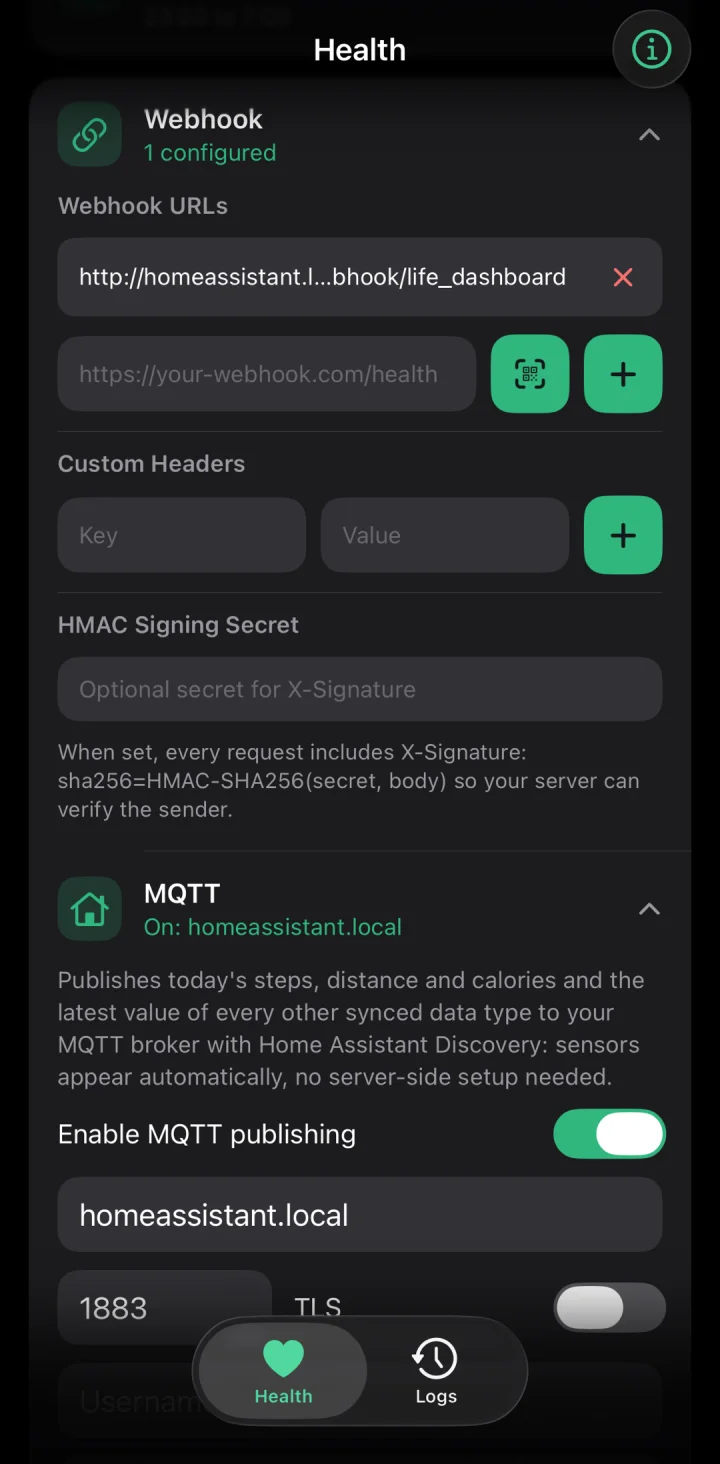
- In the app's setup, or later on the Health tab under Webhook, enter your URL. You can add several; a sync counts as delivered when one of them accepts it.
- Optional: add an
Authorizationheader or an API key as a custom header, and an HMAC Signing Secret that your server also knows. - Tap Test ping. It sends a small payload with
"test": trueand no records. If your server is at home, allow Local Network when iOS asks. - Switch on your types and allow Apple Health access. View shows the last 7 days as the payload would look, and Sync Now sends what's new. A type's first sync sends its last 7 days.
- For older data, tap Backfill and pick 30, 90 or 365 days.
What the POST looks like
Every request is a JSON POST. A shortened payload, from the iOS payload page:
{
  "timestamp": "2026-02-05T12:00:00Z",
  "timezone": "Europe/Amsterdam",
  "app_version": "1.9.0",
  "source": "healthkit_ios",
  "sequence": 42,
  "steps": [
    {
      "count": 1234,
      "start_time": "2026-02-05T08:00:00Z",
      "end_time": "2026-02-05T09:00:00Z",
      "uuid": "5B7A0C2E-8F3D-4B1A-9C6E-2D4F8A1B3C5D",
      "source": "Alex's iPhone"
    }
  ],
  "daily_totals": [
    { "date": "2026-02-05", "steps": 8421, "distance_meters": 6210.4 }
  ]
}sourceat the top ishealthkit_ios, where the Android app sayshealth_connect.timezoneis the iPhone's time zone when the payload was built. Every time in the payload is UTC, and this is the zonedaily_totalscut their days in, so a receiver knows the local day after a change to daylight saving time or a trip. Every payload has carried it since version 1.9.0.sequencegoes up by one with every payload the iPhone builds, and a retry keeps the number it was built with.- Every record has a
uuid, the Apple Health sample's own, which stays the same for the life of the record, and asource: the name Apple Health gives the app or device that wrote it. For data the iPhone or Watch records itself, that's the device's name, which often includes its owner's name. daily_totalsholds steps, distance and calories per local day, for today and the two days before, computed with Apple Health's own statistics. A walk recorded by both the iPhone and the Watch counts once there; adding up raw records counts it twice.
The keys, fields and units are the Android app's. The Android app's payload reference documents every type, and its JSON Schema covers both apps. Apple Health data types lists what an iPhone sends, key by key.
Check the signature
With a secret set, every POST carries X-Signature: sha256=<hex>, the HMAC-SHA256 of the raw request body with your secret as the key. It's the Android app's scheme, so one check covers both phones. Compute it over the bytes as they arrived, before you parse them, compare in constant time, and answer 401 to a mismatch. In Node.js:
const crypto = require('crypto');

function verifySignature(req, secret) {
  const expected = 'sha256=' + crypto
    .createHmac('sha256', secret)
    .update(req.rawBody) // the exact raw request body bytes
    .digest('hex');
  const actual = req.get('X-Signature') || '';
  return actual.length === expected.length &&
    crypto.timingSafeEqual(Buffer.from(actual), Buffer.from(expected));
}
In Python:
expected = "sha256=" + hmac.new(SECRET, body, hashlib.sha256).hexdigest()
valid = hmac.compare_digest(expected.encode(), presented.encode())
For a server behind a reverse proxy that requires a client certificate, import it as a .p12 file under Advanced. It stays in the iPhone's Keychain, and every webhook whose server asks for a certificate gets it, in the background too.
Retries and the queue
- Retries. Any 2xx counts as delivered. A network error, a timeout, 408, 429 or 5xx is tried up to 3 times in all, 1 and then 2 seconds apart. Other errors, such as 401 or 404, fail at once. An attempt gives up once the connection stands still for 10 seconds, so answer first and store afterward.
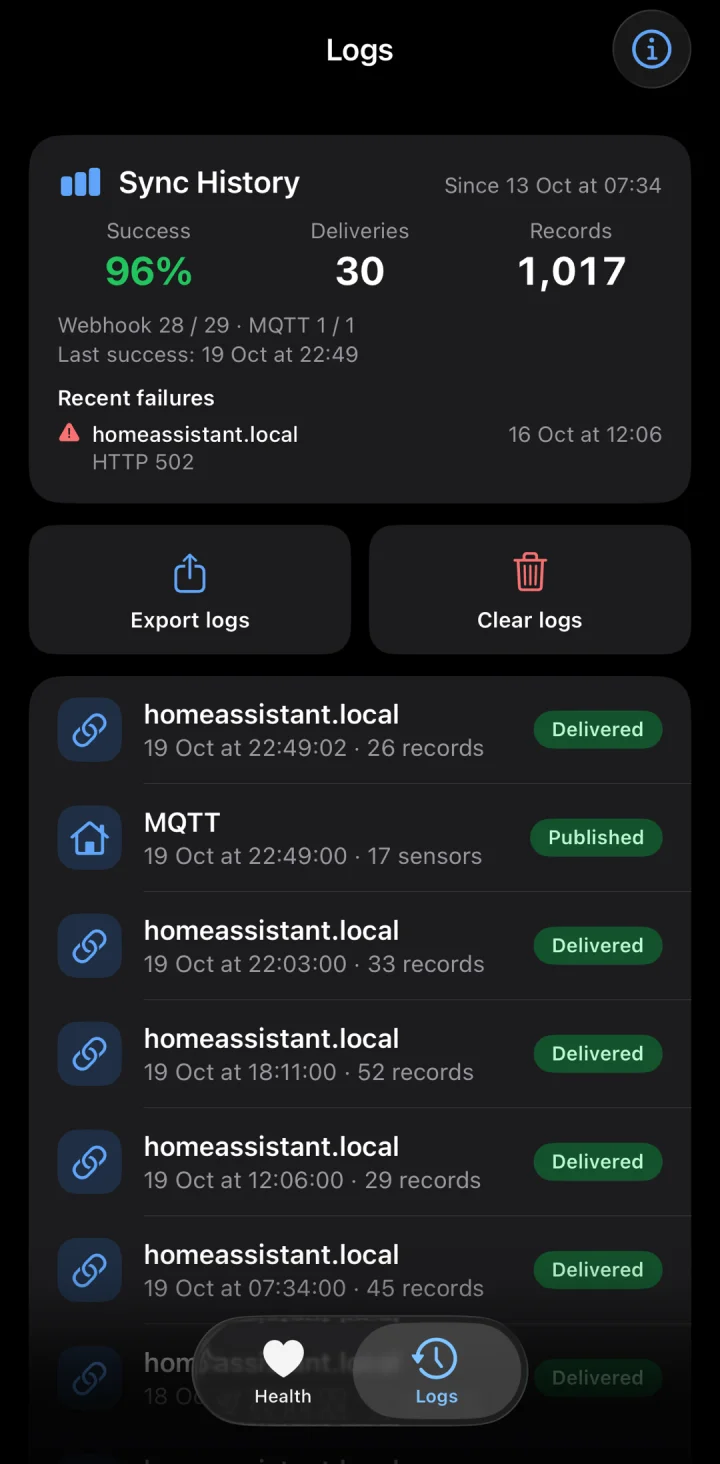
- The queue. Every payload is queued on the iPhone before it's posted, so a sync that iOS cuts off halfway loses nothing. One that wasn't delivered goes out again when the network comes back, at the next sync, or with Retry Now, oldest first, to the URLs and with the headers configured at that moment. The queue stops at the first payload that fails, so the rest keep their order.
- Refused payloads. A payload your server refuses with 400, 413 or 422 doesn't hold up the ones after it. It stays queued and is offered again once a day. Payloads queued after it can then arrive first: use
sequenceto settle the order. - Old and dropped payloads. A payload older than 7 days is dropped when your server answers its next delivery with an error, never while the iPhone is offline. The queue holds up to 700 payloads; past that the oldest goes. Each dropped payload gets a row in the Logs tab and a notification.
- Redirects are followed only on the same host. A redirect to another host, such as a login page in front of your server, counts as a failed delivery, and the log names the host it pointed at.
Deleted records
A record deleted in Apple Health leaves nothing for a sync to read, so the app follows Apple Health's own record of deletions and names what's gone in the next payload, with the key the record arrived under and the uuid it was delivered with:
"deleted_records": [
  { "type": "nutrition", "uuid": "84E37E8A-1C2D-4E5F-8A9B-0C1D2E3F4A5B" }
]- When a deletion is the only change, the sync sends a payload with
deleted_recordsand no records. - Apple Health never edits a record in place. An app that edits one deletes it and saves a new one under a new
uuid, so an edit arrives as a deletion plus a new record. - A sleep deletion names one stage, not the night. Drop that stage, or replace the nights a newer payload covers.
deletions_unavailablelists the keys a payload can't vouch for, for example when Apple Health didn't answer in time or a type wasn't read for more than 7 days. Reconcile those with a backfill.
When it sends
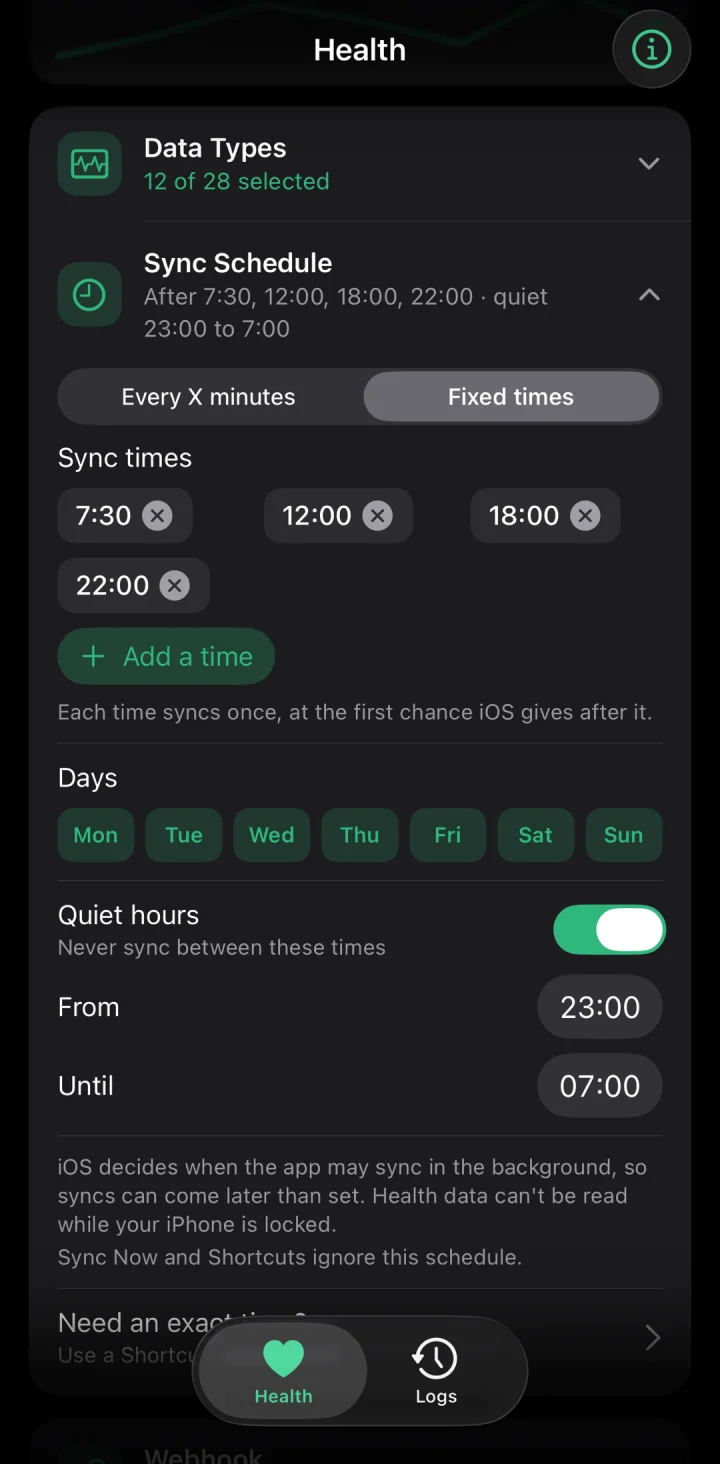
Set an interval of 15 minutes or more, 60 by default, or fixed times of day, on the days you pick, with quiet hours. iOS decides when an app runs in the background, so a fixed time means "not before". Apple Health also wakes the app when an enabled type has new data, at most as often as Apple allows for that type. Background App Refresh must be on for the app; Low Power Mode switches it off.
For a sync at an exact minute, make a Shortcuts automation that runs Sync Health Data at that time. The same action works on arriving home, by voice with Siri, from the home screen widget, and from a Control Center control on iOS 18 and newer. It sends what's queued and what's new.
iOS encrypts Apple Health while the iPhone is locked, so a sync that starts then waits for the unlock.
Backfill
Backfill sends the last 30, 90 or 365 days in 3-day windows, oldest first, with the fields backfill, window_start, window_end and window_complete. The records are the ones a sync sends, uuid included, so the overlap deduplicates. window_complete is always false from an iPhone, because Apple Health doesn't tell an app which types it may not read. Backfill payloads go to webhooks only, never to MQTT or the queue.
Receivers that work
- The Life Dashboard stack. A receiver that checks
X-Signature, Postgres and Grafana dashboards, from one compose file. Scan its pairing QR code in the app. See the Life Dashboard stack. - n8n. A Webhook node with Raw Body on, a signature check in a Code node, and a 204. Apple Health to n8n has the workflow.
- Node-RED. An http in node with Do not parse request body on (Node-RED 4.1 or later) gives the raw bytes for the HMAC.
- Home Assistant. The Life Dashboard integration turns the payload into sensors and long-term statistics.
- A script of your own. The Android payload reference has example receivers in Python and Node.js.
Store it
- Upsert each record on its payload key and
uuid. A record can arrive twice: a backfill sends its range again, and a delivery that iOS cut off is sent again from the queue. One active energy sample counts toward bothactive_caloriesandtotal_calories, so key on both. - Keep
daily_totalsas one row per date, from the payload with the highestsequencethat carried that date. - A sleep night's
uuidcomes from its earliest stage, so it stays the same while the night grows: replace the night when it comes back longer. - Delete what
deleted_recordsnames, bytypeanduuid, and ignore auuidyou don't have.
Where an iPhone payload differs from Android
- Heart rate variability is SDNN, the measure Apple Health stores. Android sends RMSSD under the same key; they're not the same number.
- A workout's
typeis a name such asrunningorhiit; Android sends a number as a string. - Sleep stages include
in_bed, the time in bed around the stages, which only an iPhone sends. - There's no screen time payload and no
_diagnosticsblock.
A receiver written for Android works unchanged, as long as it treats those as optional. The iOS payload page lists every difference.
Install the app, add your URL and tap Test ping. The iOS payload page lists everything an iPhone sends.
Get the iPhone app iOS payload referenceCommon questions
Can I export Apple Health automatically, without opening the app?
Yes. Once set up, the app syncs in the background on your schedule, and Apple Health wakes it when there's new data. The iPhone has to be unlocked for a sync to read Apple Health, and iOS picks the exact moment. For a fixed minute, use a Shortcuts automation with Sync Health Data.
Can I see the JSON before I write a receiver?
Yes. View on the Health tab shows the last 7 days as a payload, Copy puts it on the clipboard, and Share hands it over as a .json file. Export saves the same as JSON, or as CSV with a row per record.
How do I avoid counting steps twice?
Use daily_totals for steps, distance and calories. They're counted the way the Health app counts them, so an iPhone and a Watch that both recorded a walk count it once.
Does the same receiver work for an Android phone?
Yes. Both apps send the same keys, units and signature. Tell them apart by the top-level source: healthkit_ios or health_connect. Health Connect to a webhook covers the Android side.
Does the app send anything to the developer?
No. The app has no analytics, crash reporting or ads, and there's no Life Dashboard server. The data goes only to the URLs, broker or Home Assistant you set.