 Life Dashboard
How do I let my users connect their health data with one QR code?
Show each user a QR code with your webhook address and a secret for that user in it. They scan it with Life Dashboard Companion, tap Pair, and from then on their phone posts Health Connect data, or Apple Health data from an iPhone, to your service as signed JSON. Nobody types a URL or copies a secret, and you know it worked because the app sends a signed test ping straight away. The Life Dashboard integration for Home Assistant works exactly like this, and the format is open, so any service can do the same.
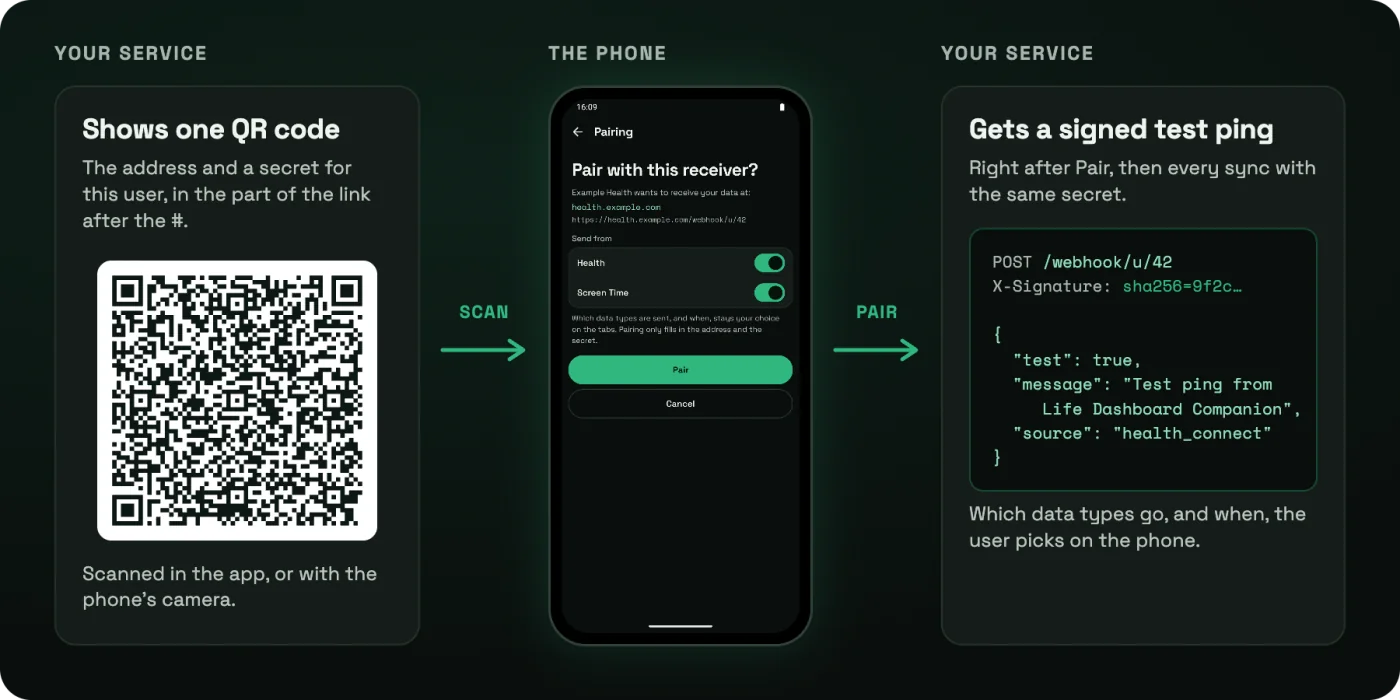
What a code can do
- Fill in one address and its secret. In the sections you allow: Health, Screen Time, or both. The user can still switch a section off on the pairing page.
- Never pick data types or a schedule. Which data is sent, and how often, stays the user's choice on the phone. A code can't quietly start sending someone's heart rate anywhere.
- Never touch other receivers. Every other address keeps its own secret and headers, and an address added by pairing starts without custom headers.
- Save nothing before Pair. The pairing page shows your name and the host the data goes to, taken from the address itself.
The link
A code is an https link with everything after the #:
https://owen282000.github.io/life-dashboard-companion-app/pair#v=1&url=<address>&secret=<secret>&name=<name>| Field | Value |
|---|---|
v | 1, the format version. Required. |
url | Your webhook address, at most 2048 characters, no spaces, no comma. Required. |
secret | The HMAC signing secret for this user, at most 512 characters, no spaces. Required. |
name | What the pairing page calls your service, up to 64 characters. Optional. |
sources | health_connect, screen_time or both, comma separated. Leave it out to accept both. |
Percent-encode every value completely, a space as %20. Python's quote(value, safe="") and JavaScript's encodeURIComponent do that; form encoding, which writes a space as +, does not. The secret sits in the fragment on purpose: a browser never sends the part after the # to a server, so when someone scans the code without the app installed, the landing page loads but the secret stays on their phone.
Build a code in Python
import secrets
from urllib.parse import quote, urlencode

import segno

PAIR_PAGE = "https://owen282000.github.io/life-dashboard-companion-app/pair"


def pairing_link(webhook_url, secret, name=None, sources=None):
    fields = {"v": "1", "url": webhook_url, "secret": secret}
    if name:
        fields["name"] = name
    if sources:
        fields["sources"] = ",".join(sources)
    return PAIR_PAGE + "#" + urlencode(fields, quote_via=quote, safe="")


secret = secrets.token_urlsafe(32)  # store this with the user
link = pairing_link("https://health.example.com/webhook/u/42", secret, name="Example Health")
segno.make(link, error="m").save("pairing.svg", scale=6, border=4)
Build a code in Node.js
import crypto from "node:crypto";
import QRCode from "qrcode";

const PAIR_PAGE = "https://owen282000.github.io/life-dashboard-companion-app/pair";

function pairingLink(webhookUrl, secret, { name, sources } = {}) {
  const fields = [["v", "1"], ["url", webhookUrl], ["secret", secret]];
  if (name) fields.push(["name", name]);
  if (sources) fields.push(["sources", sources.join(",")]);
  return PAIR_PAGE + "#" + fields.map(([k, v]) => `${k}=${encodeURIComponent(v)}`).join("&");
}

const secret = crypto.randomBytes(32).toString("base64url"); // store this with the user
const link = pairingLink("https://health.example.com/webhook/u/42", secret, { name: "Example Health" });
const dataUrl = await QRCode.toDataURL(link, { errorCorrectionLevel: "M", margin: 4 });
Both give exactly the known-good test vector that the app's own tests check, which is in the pairing reference. Use it as a unit test for your generator.
What the user sees
They scan your code in the app, under Scan a pairing code, or with the phone's camera, which opens the app directly on Android. A page says "Example Health wants to receive your data at health.example.com", with a switch for each section and the other addresses that keep their own secret. Nothing is saved until they tap Pair.
The test ping after Pair
Right after Pair, the app posts one test ping to your address, signed with the secret from the code:
POST /webhook/u/42
Content-Type: application/json; charset=utf-8
X-Signature: sha256=<hex of HMAC-SHA256(secret, raw body)>

{
  "test": true,
  "message": "Test ping from Life Dashboard Companion",
  "timestamp": "2026-10-04T12:00:00Z",
  "app_version": "1.29.0",
  "source": "health_connect"
}
Check the signature over the raw body before you parse it, answer any 2xx, and the user sees "Connected." on the page after Pair, or a short message that says "test ping delivered" during the app's setup. Answer 401 to a bad signature, as for every request after it. A ping carries no data, so it is a good moment to mark the user as connected, not something to store. Every sync after it uses the same secret and the same payload, described in the webhook guide.
iPhone
Life Dashboard Companion for iPhone reads the same codes. It sends Apple Health only, so a code must accept health_connect or leave sources out. Plain http:// works there only to a home network address, so use https. The iPhone camera opens the landing page first, which hands the code to the app with an Open in the app button.
Keep it safe
- One secret per user, from a cryptographic random generator, at least 32 bytes.
- Show the code only to that user, after they signed in. Anyone who sees it can sign data as them.
- Never log the link. It contains the secret.
- Let users rotate. A new secret means a new code; scanning it replaces the old secret on the phone.
Build a code for one test user and scan it with the app. The pairing reference has every rule, the test vector and the iPhone differences.
Pairing reference Payload referenceCommon questions
Do my users need an account with Life Dashboard?
No. There is no Life Dashboard server or account. The phone posts straight to the address in your code.
Can a code choose which health data my service gets?
No. A code only fills in the address and the secret. The user picks the data types and the schedule on the phone, which keeps the consent with them.
Can I get the payload in my own format?
No. Every receiver gets the same signed JSON, described by a JSON Schema, and your service maps it to its own model. One documented format is what lets any receiver work without a plugin.
What if the user scans without the app installed?
The link opens a page that says where to get the app, for Android or iPhone. The secret in the link never reaches that page's server.